[Mega-Thread] Computer Crashes | startup crash, freeze, launch
This is the Mega Thread for Computer Crashes
• Build Version: v0.1.0-alpha.(19629)
• Description: Multiple players reports of the game freezing or crashing during startup.
• Reproduction Steps:
1. Launch the game
2. Observe freeze or crash during startup
• Expected Behavior: The game should start normally without freezing or crashing.
• Attachments: Not provided
Comments: 42
Oldest
•
Newest
•
Most likes
•
Fewest likes
-
04 Dec, '25
Jordan MergedThe game launches fine, but then when I try to start a game it crashes.
I've checked the files, uninstalled and reinstalled, and restarted the PC
nothing works. I have an i9 14900kf with a 5090 and 32GB of RAM. -
04 Dec, '25
alissaamae MergedI am able to load into the game and have no issues with keyboard or mouse controls( I am using a Razer Huntsman V2 keyboard and a Razer Basilisk V3 Pro mouse), but I can only get about two minutes into the game before my entire laptop crashes. The furthest I have made it so far is running toward the closest iron node. I have messed around with graphics settings, played different character presets, etc. but nothing seems to help so far. Below are my specs, so capability shouldn't be an issue. I do not see anything in the Windows Logs that might hint at the problem, and I don't seem to have any player log data anywhere.
Processor: Intel(R) Core(TM) i9-14900HX (2.20 GHz)
Installed RAM: 32.0 GB
Graphics: NVIDIA GeForce RTX 4080 Laptop GPU -
04 Dec, '25
Opa Admin MergedDo you have any 3rd party programm open in the background that could cause this issue?
Old drivers could cause this as well.
If non of that is the problem it will need to be investigated. -
04 Dec, '25
Opa Admin Merged@devs Could be related to the Keyboard Issues: https://feedback.autonomicagame.com/suggestions/680852/keyboard-issues-character-autowalking. Mostly Razor Products seem to have that.
@Alissa please empty your C:\Users\[user]\AppData\LocalLow\Crytivo\Autonomica; verify the integrity of the Beta files at the steam properties of the game and try again. Provide the player.log file found in --> C:\Users\[user]\AppData\LocalLow\Crytivo\Autonomica afterwards so we have a few more Details to look at. -
04 Dec, '25
alissaamae MergedWill do! I don't seem to be having any issues with autowalking that I've noticed, so I'm not sure it would be related to that. I will work on the steps you gave, though I haven't had any player.log file in that folder. I'll let you know if that changes!
-
04 Dec, '25
alissaamae MergedI followed the requested steps and this is still an issue. I hit the "play" button at 4:13pm cst and my laptop crashed at 4:16pm cst. I still do not have a player.log file in the Autonomica folder, under the path listed above, with all hidden and system files/folders visible. I wish I could provide more information. The only indication of an issue is in my Windows Event Log, which says : 12/4/2025 4:18:09 PM "The previous system shutdown at 4:08:03 PM on 12/4/2025 was unexpected." ( these have all been off by a few minutes, I timed the crash at 4:16pm this time.) and 12/4/2025 4:17:48 PM "The system has rebooted without cleanly shutting down first. This error could be caused if the system stopped responding, crashed, or lost power unexpectedly."
I'd be glad to help out any way I can, Just let me know! -
05 Dec, '25
Jay MergedThe first time I played, I was doing one of the first few missions and building some walls. Suddenly blackscreened and my computer restarted. Tried it again a little while later and had just gotten to the iron mining spot when it happened again, so both time relatively early on in the game- within the first 'day.'
-
05 Dec, '25
Opa Admin MergedPlease empty your: LocalLow/Crytivo/Autonomica. --Folder and Verify the integrity of Beta Files via Steam properties.
Afterwards if it crashes again please provide us the player.log file found in LocalLow/Crytivo/Autonomica -
05 Dec, '25
Gaetan MergedHello!
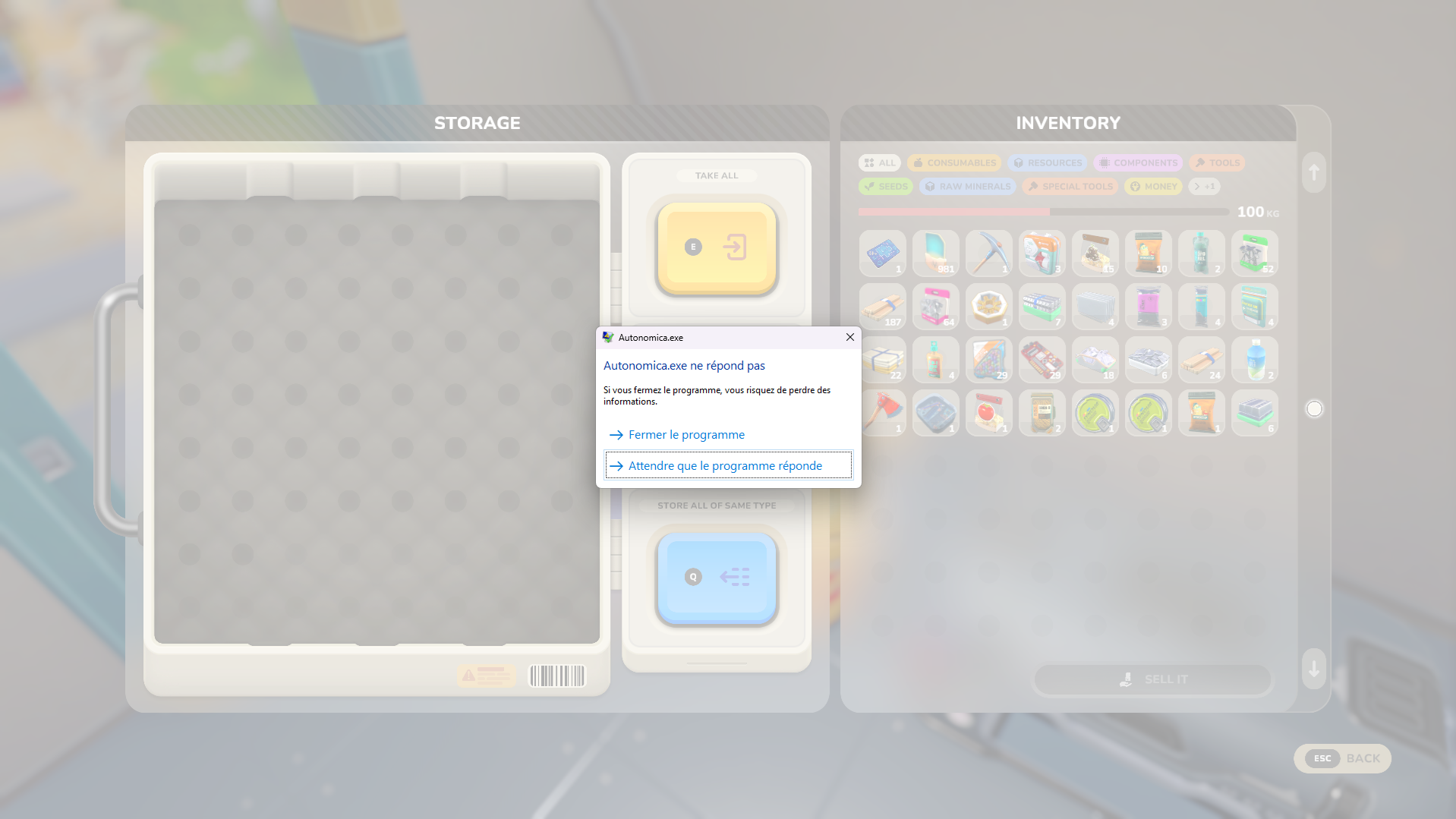
My game crashes quickly, around the time I reach the first iron node and when I build my first shelter with the bed. I have changed the graphics settings and configurations in my Nvidia control panel. Several things happen when it crashes: either I get a black screen, or I get a pop-up saying the game is not responding, sometimes I see the Unity crash handler pop-up, but not always. Sometimes I have to call up the task manager and end the programme.
While searching this site, I saw a tip in another article to empty the locallow/autonomica folder and check the beta files on Steam. I did that, and when I launched the game afterwards, it crashed on the ‘prewarming shaders 100%’ page. Then the game crashed again, just like before.
Here are my computer's specifications:
Windows 11, Intel(R) Core(TM) i7-10870H CPU @ 2.20GHz 2.21 GHz
32.0 GB RAM
NVIDIA GeForce RTX 3070 Laptop GPU
I can't find the log... -
05 Dec, '25
Magorents MergedWhen i play, the game will randomly crash with "The game is not responding" screen, i can hear the sound of the game, but it's freezed and same is my PC when i clic on "Close the program"
Have to restart my PC to be able to relaunch the game
I'm using AMD components (Ryzen 9 3900XT, 32go of Ram DDR4 3200MHZ, and a RX 6700 xt (12gb) GPU
A friend of mine that use a Nvidia GPU dosen't seem to have this issue
I tried to disable FSR to see if it helps but it's the same -
06 Dec, '25
Azalée MergedI tried several times to start a new game but the loading screen lasts for 30 seconds and then the game crash.
I tried setting the graphics to minimum but I can never get in the game.
Here are my computer's specifications:
Windows 11, Intel Core i7-12700H, 4.7 GHz
16GB RAM
NVIDIA GeForce RTX 3060 -
06 Dec, '25
Stealth MergedConfirmed same thing happens to me upon certain interactions (but it's random, can do same action with same item and it may only crash 1 of the times). Only difference is I don't need to restart my PC to relaunch the game. Have noticed the "Copy" section of GPU usage in task manager spikes from 0% to 95% as it crashes/freezes, followed by a massive drop in GPU usage from 95% to 10%.
Ryzen 7950X3D, 64GB DDR5 RAM 6000MHz, Nvidia 3080 TI (Asus Strix OC), Asus PG32UCDP monitor in 4k mode. Game running at all default settings -
06 Dec, '25
Nootse MergedI've had very similar issues and with a good PC.
I had all my settings on ultra for a little, and noticed when i turned my FSR on my game would crash and not let me load back into my world.
I've also noticed if the HDD/SSD that windows is on is full and you open Autonomica it might cause issues with other programs. for me it was discord and steam.
Anyway, after i turned FSR off I was able to load into my world fine. It didnt stop the popups for crashes when opening the game, but I noticed if I just wait it'll load.
CPU: i9-12900K
Ram: 32GB DDR5 - 5200
GPU: RX 7800XT -
06 Dec, '25
Big Easy Mergedsame issue without the need for a restart. Doesn't seem to be any real correlation to the crashes though. This last time I was just breaking boxes on a new game. Time before I was just standing there after watering plants. Both times i was in different seasons, time of day and weather.
-
07 Dec, '25
Tomo MergedAt first when I started the app it crashed immediately. On my second try I got to the main menu. When I pressed "New game" the app crashed again and fucked up my whole system. I couldn´t do anything anymore (not just steam related) and had to restart my computer. Now it always crashes at this point. I´ve got a notification that an unknown system error appeared (attached file, unfortunately in German, hope you can still do something with that).
-
09 Dec, '25
Opa System Merged"Game crashes after pressing "New game"" (suggested by <Hidden> on 2025-12-07), including upvotes (1) and comments (0), was merged into this suggestion.
-
11 Dec, '25
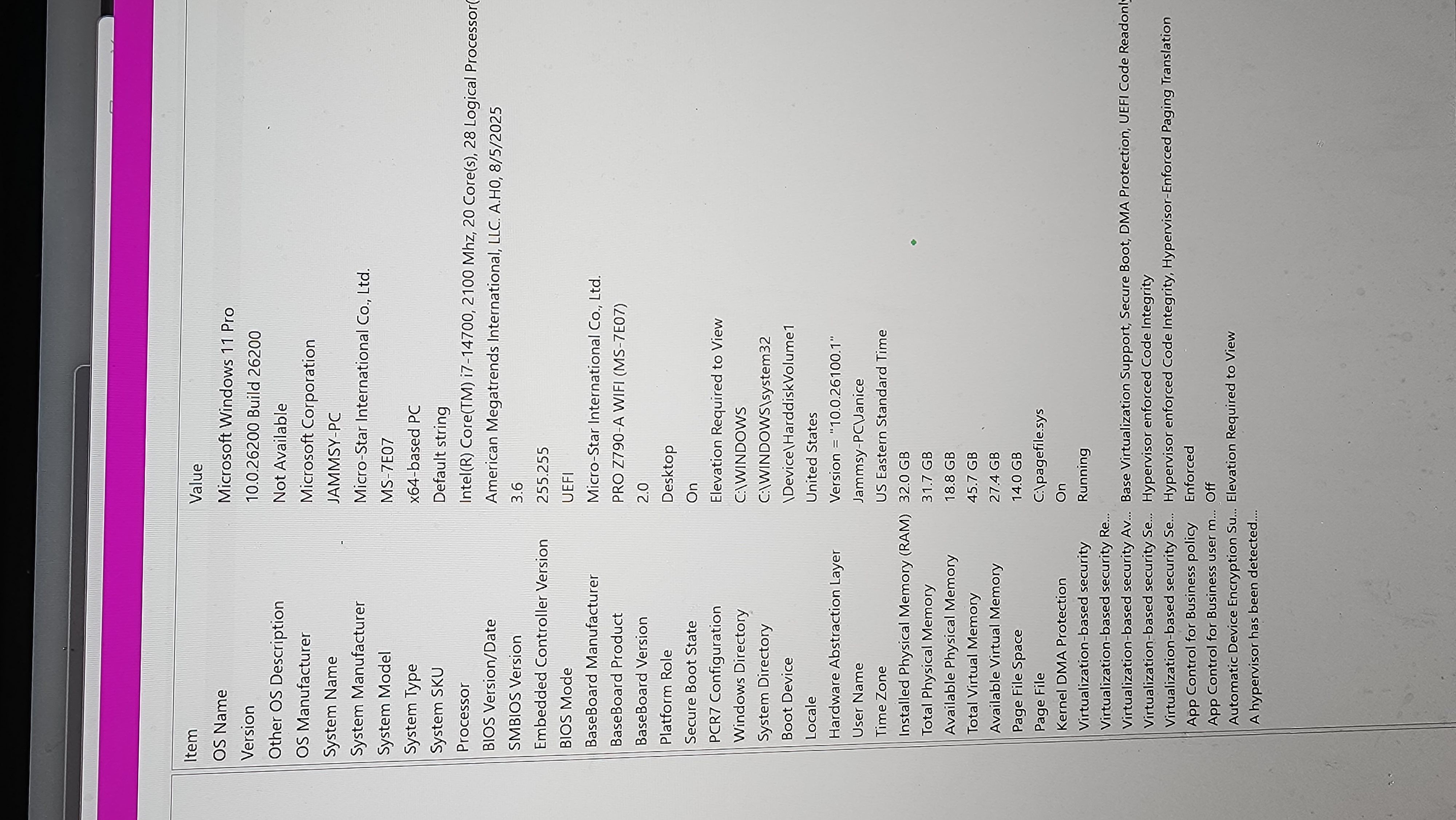
Hermi Merged• Build Version: v0.1.0-alpha.19313
• Description: After launching the game and entering the world, my monitors go black and my PC has to be restarted. Sometimes it's 3 minutes after loading in, sometimes it is 10 minutes. But everytime the monitors go black, game sound is still playing in my headphones, and eventually the PC will restart itself or I will have to force a restart with the power button.
I have reinstalled steam and deleted all crytivo files, flashed my bios, completely replaced my CPU, updated all drivers, run disk checks on my C and D drives, verified integrity of Autonomica via steam, and completed system checks of my windows installation.
• Reproduction Steps: sitting on the main menu I have no issues it is only once I am running around in the world.
• Reproduction Rate: everytime I try to play
• Expected Behavior: I expect the game to not crash my computer.
• Attachments: system information screenshot, GPU is Nvidia GeForce 4080 -
11 Dec, '25
Hermi MergedAfter updating in to the newest build that was pushed today, I am still crashing before I can reach the first Iron Ore node. According to task manager, my memory usage is around 75% of my 32GB while doing the opening quests.
-
11 Dec, '25
theDoctor MergedHi - Hermi's husband here with some additional info.
Currently event viewer logs in conjuction with BSOD minidumps point to a graphics crash. I believe that this may be related to the known memory leaks.
After starting the game, just getting into the main menu uses over 10gb of system ram with over 8gb of GPU ram. After loading into the world those numbers climb to 13.5gb of system ram and 12gb of GPU ram. Over the course of several minutes, the GPU ram climbs to 12.5gb before crashing.
The minidump codes are:
0x00000116 - VIDEO_TDR_FAILURE
0x00000133 - DPC_WATCHDOG_VIOLATION
0x00000101 - CLOCK_WATCHDOG_TIMEOUT
This is running with a 14700 and 4080 GPU - yes the microcode has been patched and everything is updated. We have also performed a full NVIDIA graphics driver reinstall with the DDU uninstall tool. SFC scannow and DISM repair have both been done to try to fix any DirectX issues. -
11 Dec, '25
theDoctor MergedWe have also tried using Unity's flags to force to DX12 which just yields a black-screen on game boot (never got to the loading splash screen). Additionally, we disabled any trace of the Intel GPU via BIOS.
At this point, short of a new GPU (not having issues in any other games) or a full Windows re-install, I am out of ideas. -
12 Dec, '25
KingIzzy Merged• Build Version: 0.1.0-alpha.19269
• Description: The game uses too much RAM and hard locks the PC. I then need to force reboot my computer. A work around was to increase the swap memory from default 4 GB to 8 GB
• Reproduction Steps: Launch the game with my PC specs
• Reproduction Rate: 5/5
• Expected Behavior: Not crash PC
PC Specs:
Operating System: Bazzite 43
KDE Plasma Version: 6.4.5
KDE Frameworks Version: 6.19.0
Qt Version: 6.9.2
Kernel Version: 6.17.5-ba07.fc43.x86_64 (64-bit)
Graphics Platform: Wayland
Processors: 16 × AMD Ryzen 7 2700X Eight-Core Processor
Memory: 16 GiB of RAM (15.6 GiB usable)
Graphics Processor: AMD Radeon RX 7800 XT
Manufacturer: Gigabyte Technology Co., Ltd.
Product Name: AB350N-Gaming WIFI
Solution steps:
1. https://www.reddit.com/r/Bazzite/comments/1dlbf00/increase_swap_memory/
2. Steam launch command: systemd-run --user --scope --collect --send-sighup --unit=memlimitgame --property=MemoryHigh=11G --property=MemoryMax=19G -- %com -
12 Dec, '25
James System"RAM usage crashes PC" (suggested by <Hidden> on 2025-12-12), including upvotes (1) and comments (0), was merged into this suggestion.
-
12 Dec, '25
James System"PC Crash" (suggested by <Hidden> on 2025-12-11), including upvotes (1) and comments (1), was merged into this suggestion.
-
12 Dec, '25
James System"Laptop Crashes about 2 minutes into the game" (suggested by <Hidden> on 2025-12-04), including upvotes (1) and comments (3), was merged into this suggestion.
-
12 Dec, '25
James System"Game crashing computer" (suggested by <Hidden> on 2025-12-05), including upvotes (1) and comments (1), was merged into this suggestion.
-
03 Jan
wardog MergedBuild Version: v0.1.0-alpha.20005
Description:
The game crashes to desktop with an access violation inside UnityPlayer.dll. . The crash occurs at offset 0x8B57C6 within the engine, indicating a native Unity engine failure rather than managed code. The crash thread is not the main thread but a worker/callback thread with a small stack, suggesting a GPU callback, job system worker, or engine subsystem fault. GPU‑related modules (DXGI, D3D11, NVIDIA driver stack) were active at the time of the crash, and GPU crash heuristics indicate a likely graphics‑pipeline failure.
Reproduction Steps:
In winter, was building lots of timber foundations and stairs then made around 100 of the steel frame items at the workbench (iron rods and iron plates).
Reproduction Rate:
unknown
Expected Behavior:
The game should continue running without crashing, and UnityPlayer.dll should not trigger an access violation during normal gameplay or GPU operations.
Attached summary of crash min -
20 Jan
Weggy System"UnityPlayer.dll Access Violation Crash During Gameplay (0xC0000005)" (suggested by <Hidden> on 2026-01-03), including upvotes (1) and comments (0), was merged into this suggestion.
-
29 Jan
James System"My game crash immediately" (suggested by <Hidden> on 2025-12-06), including upvotes (3) and comments (2), was merged into this suggestion.
-
02 Feb
Sean MergedWhile playing the game, after 10 minutes of game-play, my whole computer shuts down and resets. It crashes at various times from mining stone or quartz, to using the crafting table, to running around. It's interesting that the game doesn't crash but my whole computer does.
-
02 Feb
James System"game crashes computer" (suggested by <Hidden> on 2026-02-02), including upvotes (1) and comments (0), was merged into this suggestion.
-
02 Mar
James System"Random crash during playing session" (suggested by <Hidden> on 2025-12-05), including upvotes (8) and comments (3), was merged into this suggestion.
-
02 Mar
James System"Unable to start a game" (suggested by <Hidden> on 2025-12-04), including upvotes (2) and comments (1), was merged into this suggestion.
-
18 Mar
Lunar TwilightI commented in a similar thread,s o mods and delete this (or the other one) iof in the wrong place:
Same issue since the alpha started. I may be able to play a few times, but randomly, the game will crash when it launches. After that, it won't launch. When I try to restart my computer, it won't bring up my VPN and when I try to log into Steam, it crashes. When it does this Steam itself is unusable and I can't play ANYTHING. When I tried deleting the Autonomica folder, it often slows down my computer immensely. When I'm finally able to get in the folders and delete the game files, then restart the computer again, everything boots up as normal.
Since this game severely crashes my computer to the point where it's almost unusable, I've stopped playing the game. It has happened on every build version of this game. -
18 Mar
stephanie MergedMon jeu crashe à plusieurs reprises, j'ai voulu relancé ma partie de cette nuit , ma progression a été supprimé, je n'ai plus rien dans mon sac inventaire ni dans mon coffre, mon avancé dans les machines a été supprimé, je n'ai plus d'outils que j'avais crée non plu, on m'a supprimé mes plantations par contre j'ai encore les trous dans la terre... et on m'avait laissé ma cabane, et mes machines , je n'ai plus de quêtes non plus, je vais devoir recommencer une partie mais va t'elle être sauvegardé ?
My game keeps crashing. I tried to resume my session from last night, but my progress was deleted. I have nothing left in my inventory or in my chest, my progress with the machines is gone, and I no longer have any of the tools I created. My crops were deleted, but the holes in the ground are still there... and they left me my cabin and my machines, I don’t have any quests either, I’m going to have to start a new game, but will it be saved? -
18 Mar
James System"Le jeu crashe , bug" (suggested by <Hidden> on 2026-03-18), including upvotes (1) and comments (0), was merged into this suggestion.
-
18 Mar
James System"Mon jeu crash après 5 minutes environ | My game crashes after about 5 minutes." (suggested by <Hidden> on 2025-12-05), including upvotes (2) and comments (0), was merged into this suggestion.
-
19 Mar
SpringfallendeerFor me, the game opens just fine. I can load in, see the disclaimer, and even mess around with things on the main menu. I can change my controls fine. I can cycle through the character presets. I can adjust things like the audio or other settings. However, when I proceed to hit "new game", the game will spend a minute or so loading before abruptly giving me a crash message. Following which the game automatically closes due to the crash.
There are no signs of lag or delay on the menu. I have tried with background programs (such as a youtube video in the background) open as well as with all programs closed. The crash persists. 3 times opened, 3 times crashed. -
24 Apr
chrisJust had 2 in game crashes and i lost a half hour of play each time. current version v0.0.3-alpha.23466
-
26 Apr
D-Dub MergedWhen building large structures, the game starts getting choppy and then crashes. On crash, memory (32gb) is released, but Steam must be restarted to release swap file space (~80% to 10%). The choppiness starts after placing approx. 4 blocks.
-
29 Apr
chrisMy game crashed during a restart following exit save. now any attempt to load my exitsave causes my game to crash.
-
29 Apr
James System"Crashes while building large structures" (suggested by <Hidden> on 2026-04-26), including upvotes (1) and comments (0), was merged into this suggestion.
-
15 May
Lunar TwilightThis is a copy-paste from the Discord server. I've had this issue since the beginning.
After booting pr playing, it would crash, which then caused my computer to run slowly, my VPN wouldn't start on a restart, and it would completely mess up Steam. The only remedy was uninstalling all the game files and even then, it may take a couple tries. I was told it was a known bug and to shut down all unnecessary process before starting the game. I have since tried that this week and it was great for 3 sessions. While playing tonight, I tried restarting since my crops weren't getting watered (and yes, I tried from different angles and lengths). The crash happened again when I tried to restart the game, as well as my cpu running slowly. Luckily, I could use the command center to shut down the game and Steam still worked so I could uninstall the game files.
This is ridiculous. I really love this game when it works and was looking forward to playing it. It's unplayable like this.
 Screenshot_2025-12-07_143028_xptrnp.png
 17654200070296956743399614860339_tlceox.jpg
 Autonomica.exe.12216.report.20260103-213354_azm5nb.txt
 bug_report_1_rhmenu.png